ClevCalc - Calculator
- 4.6
- Rating
- 100.00M
- Installs
- Free
- Price

 Analysis by App-foxy
When I need a calculator for ordinary life, I do not want to hunt through menus or open a spreadsheet just to check a bill, convert a measurement, or split a restaurant total. ClevCalc - Calculator is built around that everyday need. Developed by Cleveni Inc., it is a free productivity app for Android, with a clean approach that makes it more useful than the basic calculator already sitting on many phones.
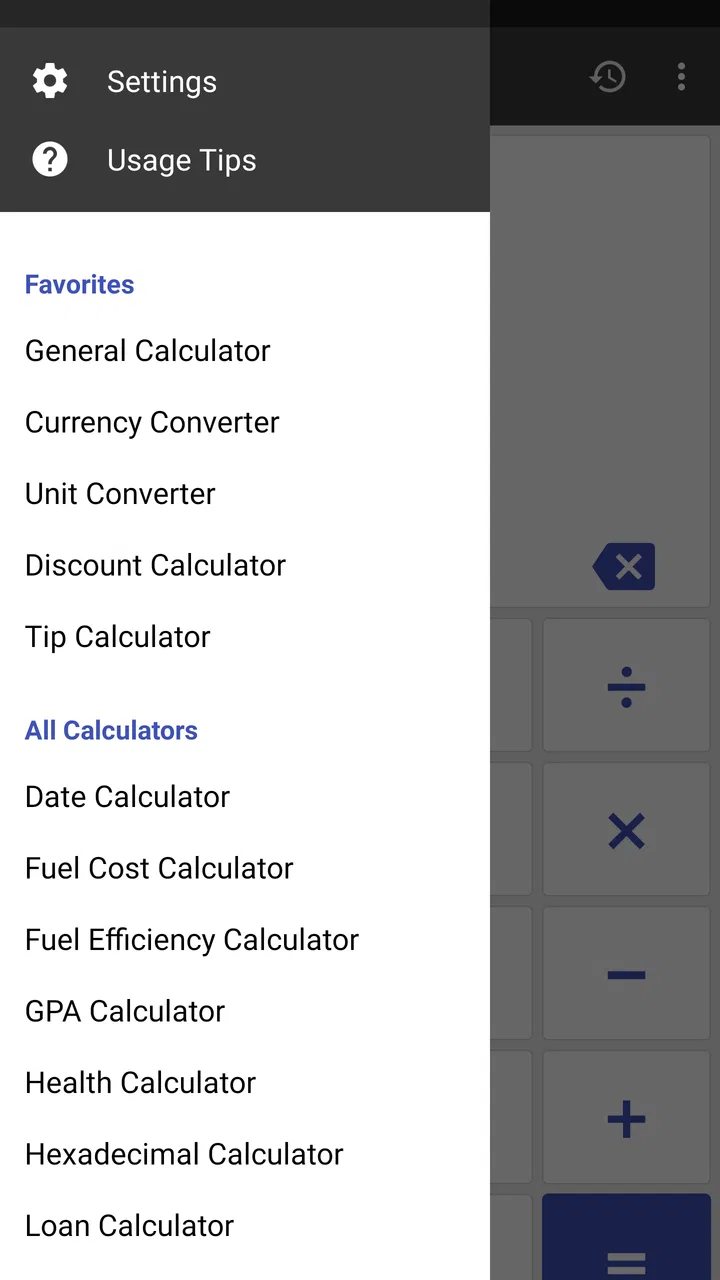
My first impression is that ClevCalc is best understood as a practical toolbox rather than a specialist calculator. It is aimed at quick decisions: working out discounts, checking a loan-related figure, converting units, calculating dates, or handling a calculation that is slightly more involved than simple addition. The app is rated for Everyone, so it is an approachable choice for households, students, shoppers, travelers, and anyone who wants several calculation tools in one place.
The important question is not whether it can replace every calculator app. It cannot, and it does not need to. The better question is whether keeping one focused utility is more convenient than switching between a phone calculator, a conversion website, a notes app, and a spreadsheet. In my experience, that is where ClevCalc makes its strongest case.
You May Also Like

 Blood Strike: 2.5 Anniversary
Blood Strike’s Loadouts Turn Every Drop Into a Tactical Gamble
A close look at Blood Strike’s custom loadouts: how fast access to signature weapons reshapes its battle royale rhythm, rewards preparation, and narrows the gap between fights.

 Pandora - Music & Podcasts
Pandora’s Music Is Easy to Start, but Harder to Recover
Pandora’s strength is its low-effort path from a seed to a station. Its weak spot is how much confidence it asks you to place in connection, setup, and quiet recovery.

 8 Ball Pool
 Is Built on Rivalries, Rematches, and Routine
A close look at the rivalries, rematches, shared routines, and unanswered safety questions that turn a quick pool match into a persistent mobile community.

 Samsung Music
’s Quiet Strength Is Playing What You Already Own
Its reach comes less from spectacle than from dependable access to a personal library. That simplicity is both the app’s strongest retention engine and its ceiling.

 AccuWeather: Weather Radar
AccuWeather Review: A Quick, Clear Forecast for Everyday Decisions
For everyday plans, the best forecast is the one you can understand quickly. AccuWeather makes rain timing, radar, and local conditions easy to act on, with a few trade-offs.

 Hill Climb Racing
Why Hill Climb Racing Still Turns Crashes Into One More Run
A tiny car, a bumpy hill and one more upgrade: Hill Climb Racing keeps resurfacing because its simple chaos makes every near-miss feel personal.
More From Our News Desk
View All News


How I decide whether a calculator app is worth keeping
I judge this kind of app by four things: speed, clarity, range, and trust. Speed means I can reach the right tool without thinking about the interface. Clarity means the result is easy to read and the inputs are not confusing. Range means the app handles more than arithmetic without becoming a cluttered technical instrument. Trust means I can review what I entered instead of accepting a number I cannot explain later.
ClevCalc performs well on the first three criteria for normal personal tasks. Its purpose is immediately clear, and the collection of calculators gives it more practical reach than a single-purpose calculator. I also like the fact that it remains a dedicated productivity app. It does not ask me to organize a project, create an account, or build a complicated workflow before I can calculate something.
That simplicity matters when the calculation is part of another task. If I am comparing prices in a shop, I want to check the percentage difference and move on. If I am cooking and need to adjust a quantity, I want a conversion tool rather than a search result surrounded by unrelated information. If I am planning a payment, I want a focused screen where the relevant values are visible together.
There is also a useful distinction between a calculator that is merely powerful and one that is convenient. A scientific calculator may be better for advanced mathematics, while a spreadsheet is better for a long list of changing values. ClevCalc sits between those extremes. It is more capable than the calculator that comes with a phone, but less demanding than a full financial or spreadsheet application.
The everyday tools that make it useful
The main strength is the variety of calculation areas gathered inside one app. I can move from ordinary arithmetic to conversions and practical planning without installing separate utilities. That reduces the small amount of friction that usually makes people reach for a browser instead.
A realistic example is grocery shopping. I might see a product with a discount, compare the price per quantity, and then convert a measurement for a recipe. With separate tools, I would copy figures between screens and risk losing track of the original amount. With ClevCalc, the workflow is more contained: choose the relevant calculator, enter the values, check the result, and return to the shopping decision.
Another useful situation is preparing for a trip. Currency-related calculations, unit changes, and date planning often appear together, even though they are different tasks. I would still verify important financial figures independently, but having these basic calculations available in a single utility is convenient when I am making a rough plan or checking whether an estimate looks reasonable.
The real advantage is not one spectacular function; it is the reduced need to switch tools during small, unrelated tasks. That is a subtle benefit, but it is exactly the kind of convenience that determines whether an app stays installed.
Where ClevCalc is stronger than the usual phone calculator
The default calculator on a phone is usually fine for a quick sum. Its weakness appears when the question changes from “what is this total?” to “which tool should I use for this situation?” A basic calculator does not normally guide me toward a percentage, conversion, date, or planning-oriented calculation. ClevCalc gives those tasks a clearer home.
This makes it especially helpful for people who do not want to remember formulas. I can calculate a percentage without manually reconstructing the operation, and I can approach a conversion as a direct input task instead of looking up a formula first. That is valuable for occasional users who understand the answer they need but do not want to become experts in the calculation behind it.
I also find the dedicated format less distracting than using a search engine. A web search may produce an answer, but it can involve advertisements, unclear assumptions, or a result that is difficult to reproduce. In an app designed for calculations, I can see the values I entered and make a more deliberate check before acting on the result.
For students, the benefit depends on the subject. ClevCalc can be handy for routine arithmetic, conversions, and checking everyday calculations. It is not the same as a learning tool that explains mathematical reasoning step by step. I would use it to verify work or handle practical figures, not as a substitute for understanding an equation.
Small workflows that improve accuracy
One habit makes a significant difference: I decide what the result should represent before entering numbers. For example, when working out a discount, I first identify whether I want the amount saved, the final price, or the percentage difference. This prevents a correct calculation from answering the wrong question.
I also keep the original figure visible in my notes when the result affects a purchase or a bill. ClevCalc is convenient for producing the number, but a calculator alone does not preserve the context of why I calculated it. Writing a short label such as “final price after discount” makes it easier to catch a mistaken assumption later.
A second useful approach is to calculate the same situation from two angles when the number matters. For a discount, I may calculate the saving first and subtract it from the original price. If both routes agree, I have more confidence that I used the intended values. This is not a special feature of the app, but the app’s focused tools make that checking process quick enough to use in real life.
For conversions, I avoid treating a result as automatically authoritative when the source measurement is ambiguous. A recipe, luggage limit, or building measurement may use different conventions. ClevCalc can perform the conversion, but I still need to confirm whether the starting unit and the target unit match the situation. That is an important limitation of every conversion calculator, not a flaw unique to this one.
Who benefits most from the focused design
I would recommend ClevCalc to anyone who frequently performs practical calculations but does not need a professional mathematical environment. It suits people managing household expenses, comparing products, adjusting recipes, estimating travel figures, checking dates, or handling school and office calculations that go beyond a simple total.
It is also a good fit for users who prefer one familiar utility over a collection of narrowly focused apps. The free price removes the main barrier to trying it, while optional in-app purchases range from $2.99 to $24.99 per item. That means I would begin with the free experience and only consider an upgrade if a specific paid element genuinely improves my routine.
The app has broad reach: it has passed 100 million installs and holds a 4.6 average from around 1.2 million ratings, with roughly 21 thousand written reviews. Those figures do not prove that every user will like the interface, but they do suggest that the basic idea has worked for a large audience. I would still judge it by my own habits, because a popular general utility can be unnecessary for someone with very specialized needs.
Where another option may be the better choice
ClevCalc is not the right answer for every calculation problem. If I am doing advanced algebra, trigonometry, statistics, or programming-related work, I would choose a specialist calculator that shows more mathematical structure and supports the notation I need. A general-purpose utility can be convenient while still being the wrong environment for serious technical work.
A spreadsheet is also better when I need a table of figures, formulas that update automatically, or a record that can be shared and edited later. ClevCalc helps me answer individual questions. It is not a replacement for building a household budget, tracking business expenses, or comparing many scenarios over time.
For financial decisions, I would be cautious about relying on a general calculator as the final authority. It can help me explore a payment or estimate, but taxes, interest conventions, fees, and local rules can change the real outcome. A dedicated financial service or official calculator is more appropriate when the result has legal or substantial monetary consequences.
There is a similar trade-off with date and time calculations. A utility can help me get a quick answer, but appointments, deadlines, and travel plans may depend on time zones, regional rules, or calendar details. I would use ClevCalc for an estimate and then confirm important dates in the calendar or service that governs the event.
Some users may also prefer the absolute minimalism of the built-in phone calculator. If I only add, subtract, multiply, and divide a few times each week, installing a broader tool may add more choice than value. ClevCalc earns its place when I use its range, not merely because it can perform basic arithmetic.
The cost of changing from a basic calculator
Moving to ClevCalc is easy because the underlying habit remains familiar: open the app, select a calculation, enter values, and read the result. The adjustment is learning where the different tools live and remembering that I may need to choose a specialized calculator instead of staying on the default screen.
The bigger cost is not money; it is attention. More options can slow me down if I open the app without knowing what I am trying to calculate. I avoid that by treating the home screen as a toolbox and choosing the task first. Once that habit becomes automatic, the extra options feel useful rather than distracting.
I would also be selective with in-app purchases. Since the app is free to start, I do not see a reason to pay simply to unlock possibilities I may never use. I would first test it during the situations that motivated the download: shopping, conversions, personal planning, or schoolwork. If the free version already covers those needs, there is no practical reason to change the arrangement.
Compatibility is straightforward for many Android users because the app supports Android 8.0 and later. The current version is 2.24.12, so I would check the device requirement before installing on an older phone. For anyone moving between platforms, I would also consider whether the same workflow is available where I need it; a calculator is most useful when it is present at the moment a question comes up.
My recommendation after using it as a daily utility
I recommend ClevCalc for people who want a free, approachable collection of practical calculators rather than a bare arithmetic pad. Its strongest use is everyday decision-making: checking a price, converting a quantity, planning a figure, or verifying a result without opening several unrelated tools. The design makes sense for an Everyone-rated productivity app, and the large installed user base reflects how broadly that need applies.
I would skip it if my requirements are limited to basic sums, or if I need a professional mathematical, financial, or spreadsheet workflow. In those cases, the built-in calculator or a specialist alternative may be cleaner and more capable. I would also avoid treating any general calculator as a replacement for official information when a result affects contracts, taxes, medical dosing, or major financial commitments.
For everyone between those extremes, the app is easy to justify. I like it because it turns several occasional tasks into one repeatable routine without demanding much learning. My advice is to install it, try it on a real task rather than a random test, and pay attention to whether the extra calculators save you time. If they do, ClevCalc - Calculator becomes a useful pocket toolbox; if they do not, the simpler option is probably the better one.
Cleveni Inc. has kept the product focused on a problem most phones only partly solve. That focus is its main appeal and also its boundary. It will not replace every specialist tool, but for quick, understandable calculations across ordinary life, I find it more useful than relying on a basic calculator alone.
FAQs for ClevCalc - Calculator
01What features does ClevCalc offer beyond basic calculations?
ClevCalc is more than just a standard calculator. It includes a wide range of features such as currency conversion, unit conversion, world time conversion, and more. Users benefit from specialized tools for calculating loan interest, health metrics like BMI, and even discounts. This versatility makes it an invaluable tool for both personal and professional use.
02Is ClevCalc free to use, or does it have any in-app purchases?
ClevCalc is available as a free app, providing access to its primary functions without charge. However, it does offer in-app purchases to unlock premium features, remove ads, and enhance user experience. These purchases are optional and cater to users who desire a more extensive toolset and ad-free environment.
03How accurate are the conversions and calculations in ClevCalc?
ClevCalc is designed to provide accurate and reliable calculations across its various functions. The app regularly updates its currency conversion rates and adheres to standard mathematical formulas for different calculations. Users can trust its precision for day-to-day tasks, though it’s always wise to verify critical calculations independently.
04Does ClevCalc require an internet connection to function?
ClevCalc operates offline for most of its basic calculator functions. However, features like currency conversion and world time require an internet connection to provide the most current data and updates. This ensures users have access to accurate and up-to-date information when needed.
05Is ClevCalc user-friendly for individuals with minimal technical knowledge?
ClevCalc is designed with user-friendliness in mind, featuring an intuitive interface suitable for individuals with varying levels of technical expertise. Its straightforward navigation and clear categorization of tools make it accessible for users who may not be tech-savvy, ensuring a smooth and efficient user experience.
Pros
- Intuitive interface with easy navigation.
- Supports a wide range of calculations.
- Includes currency converter feature.
- Offers unit conversions for various fields.
- Lightweight app with fast performance.
Cons
- Ads can be intrusive at times.
- Some features require in-app purchases.
- Limited customization options.
- Occasional minor bugs reported.
- No dark mode available.

ClevCalc - Calculator
Gallery